
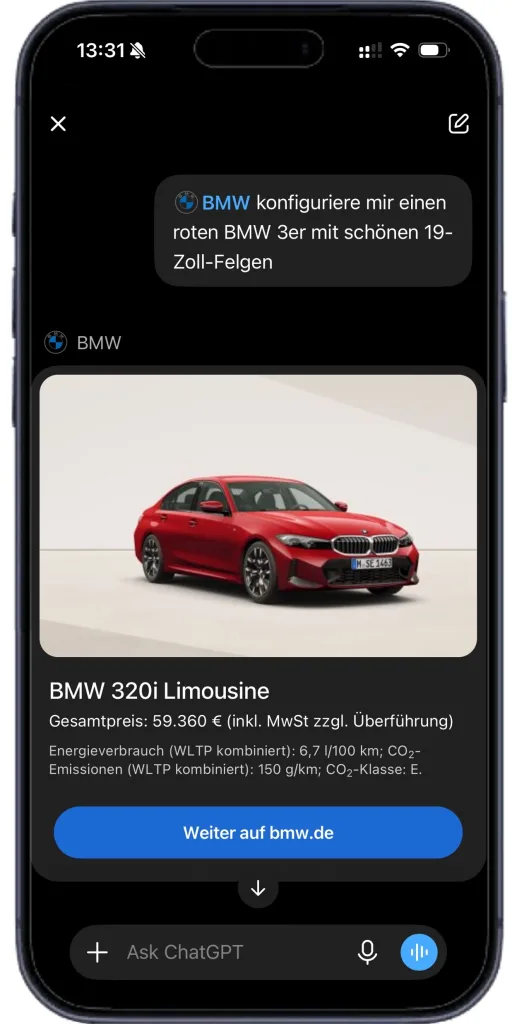
BMW is expanding how it communicates with customers online by putting its vehicle configurator directly inside OpenAI’s ChatGPT.
Through a new BMW plugin, buyers can now talk through building their ideal car in plain conversation rather than clicking through a traditional configurator, with the tool combining ChatGPT’s dialogue capabilities with BMW’s own product and configuration data. It’s available on both desktop and mobile.
Why Conversation Is Replacing Menus
Generative AI is reshaping how people search for information and make decisions online, with dialogue-based tools increasingly taking over from traditional search engines and websites.
BMW says it’s the first automaker to offer digital vehicle advice directly through ChatGPT, positioning itself early on that shift.
How the Plugin Actually Works
Rather than clicking through menus and submenus, users simply describe what they’re looking for — interior space, ground clearance, powertrain type, intended use — in their own words. ChatGPT then suggests suitable models and configurations based on that input, making it easy to compare different setups side by side.
Those recommendations can be adjusted, compared and refined at any point in the conversation, with the system able to factor in specifics like running costs, driving dynamics, color, model or all-wheel drive on request.
BMW says this kind of dialogue-based approach is particularly useful for buyers with complex specification needs, offering a more intuitive way to fine-tune a build. Once a configuration is settled, it can be opened directly in the BMW Configurator, and customers can also browse in-stock vehicles with a similar spec.
All suggestions draw on the latest BMW Configurator data, though ChatGPT can pull in additional information from the internet for anything outside that database, provided the relevant functions are enabled.
Where to Find It
The plugin sits directly inside ChatGPT. On chatgpt.com, users can find it under the “Plugins” menu by searching “BMW“; the process is much the same on mobile, accessible through the “Plugins” option in the main menu once logged in.